Works offlineNo account needed for your first 20 savesNo ads, no tracking
The problem
Saved everywhere. Findable nowhere.
A reel on Instagram, a thread on X, a clip on TikTok, a video on YouTube — every app keeps its own saved list. None of them are titled, sorted or searchable, so you never find any of it again.
What it does
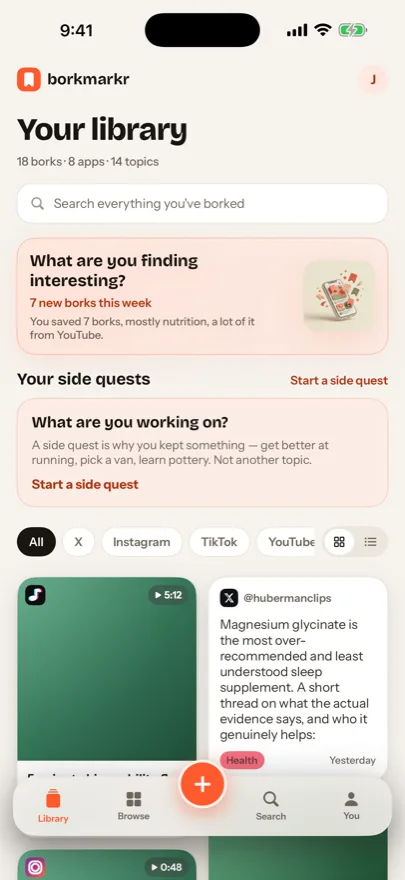
One library above all of them.
Saving is instant. Organising is optional — bookmarker does most of it for you, and you can change anything it gets wrong.
Save from anywhere
Tap Share in any app and pick bookmarker, or paste a link. The title, the account that posted it and a thumbnail come along automatically. Pin bookmarker to the front of your share sheet once (More → Edit → add to Favorites) and it's the first icon every time.
It files itself
Every bork lands in a topic and subtopic — Fitness › Mobility, Recipes › Meal prep. Fifty topics, six hundred subtopics, and you can add your own.
Browse two ways
By topic, to see everything about running no matter where it came from. Or by app, to see everything you kept from TikTok. Each view filters the other.
Find it again
Search titles, tags, notes, people and links. A Related strip surfaces the near-matches — what you meant, not just the words you typed.
Notes, and a memory
Add a dated note to any bork so you remember why you kept it. bookmarker also counts how many times you’ve gone back to it.
Side quests
Running a marathon, choosing a car, planning a trip? Group the links that help with the goal, and add a daily habit if it needs one.
How it works
Share. Bork. Filed.
STEP 1
Share
Tap Share in Instagram, TikTok, YouTube — anywhere — and pick bookmarker (on X, tap Share, then Share via…). Pin it once — scroll the app icons to More, tap Edit, add bookmarker to Favorites and drag it to the front — and it's the first icon from then on. Or paste a link straight into the app.
STEP 2
bookmarker
The title, who posted it and a thumbnail are fetched on the spot. Saving takes one tap; organising is optional and can happen later.
STEP 3
Filed
It lands in a topic and subtopic, ready to browse, search and open — straight back to the original post in the app it came from.
Import
Bring what you already saved.
Import your browser bookmarks, or the data export from X, Instagram, TikTok or YouTube. Thousands of old saves become a sorted, searchable library in one step.
From
Browser bookmarksXInstagramTikTokYouTube
sorted on your phone
Into
FitnessRecipesCarsLearnMake+ 45 more topics
Built to stay yours
On your phone. Nobody else’s business.
Offline by defaultEvery feature works without an account or a connection. Your library lives on your iPhone.
Optional sign-inWant backup and sync? Sign in with your email and a six-digit code. No password to create.
No ads, no trackingThe app asks for zero permissions and has no ad or analytics SDKs. It stores links, not content — opening a bork sends you to the original post.
Free, and works without an account for your first 20 saves. After that, signing up is free too — an email and a six-digit code — and makes it unlimited, backed up, and readable on the web. On your iPhone, scan the code and tap the button.
One payment, no subscription: the iPhone app, the web app, the AI filing, and every future feature. The founders price is capped at the first hundred people.